
Data typed in three times
Legal name, VAT number and line items move by hand from the CRM to the quote, and from the quote to the invoice.
CRM and invoicing
Opportunities move stage by stage, the customer accepts the quote from a link, the invoice is born from the won deal and payments are tracked due date by due date. Agents prepare the drafts; the number and the sending stay your call.
The problem
The CRM on one side, the invoicing tool on the other, a spreadsheet in between. Every hand-off is a copy and paste.
Legal name, VAT number and line items move by hand from the CRM to the quote, and from the quote to the invoice.
Attached PDFs, verbal yeses, billing details chased afterwards: nobody knows who accepted what.
The deal is closed, the invoice isn’t. You only notice when the money doesn’t arrive.
Due dates, reminders and partial payments live in a spreadsheet nobody updates.
The result
Hours of admin, late invoices and money that arrives later than it should.
What it does
Four steps in a row, with the next action already written on every card. Around them, recurring contracts and reports for whoever keeps the books.
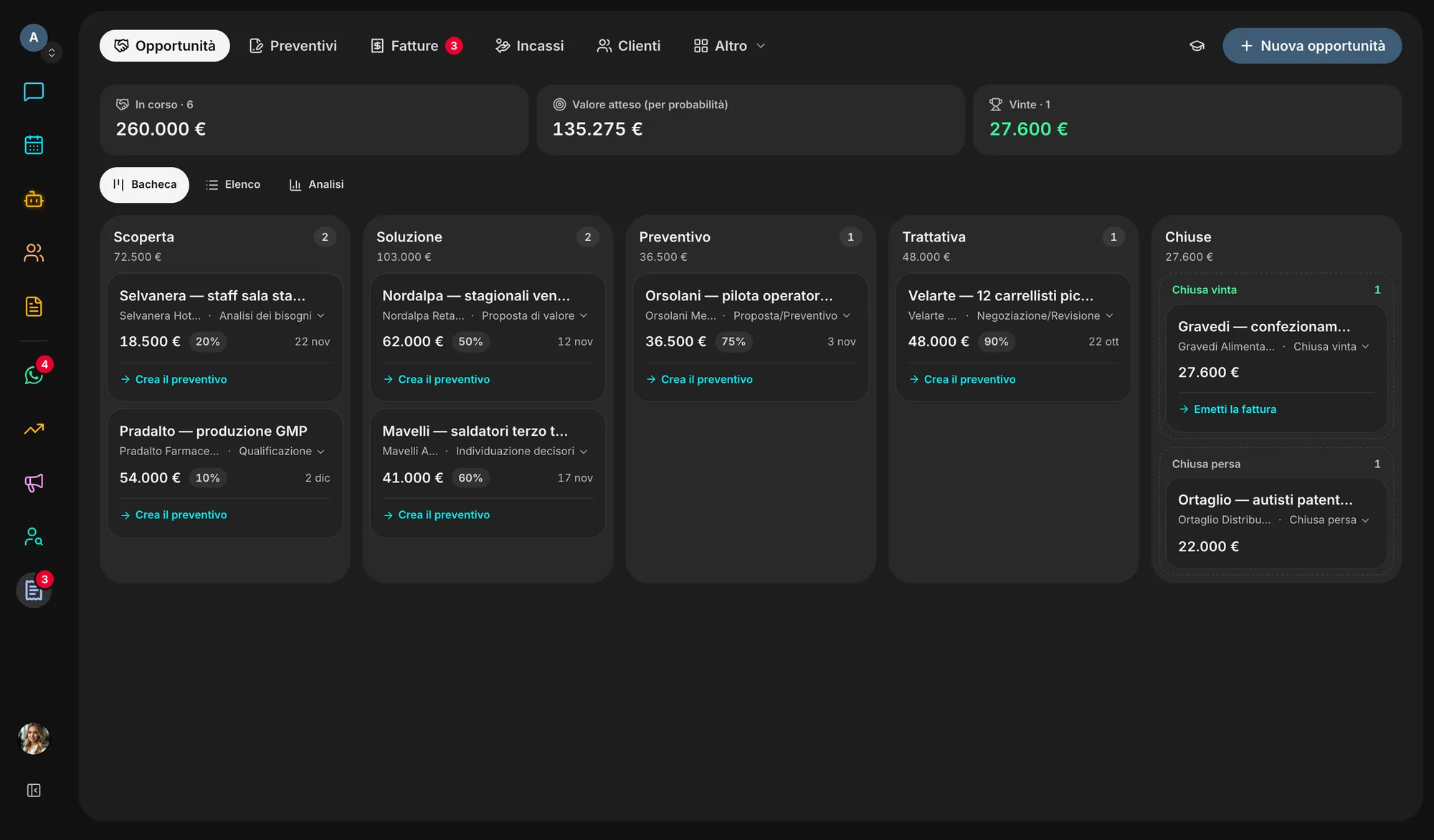
The classic CRM stages, from prospecting to close, each with its probability: open and weighted value side by side. Drag the card across the board and it tells you the next step.
The customer opens the link, fills in billing details and the order number, attaches the signed copy and accepts. A discount above your threshold waits for an admin’s approval.
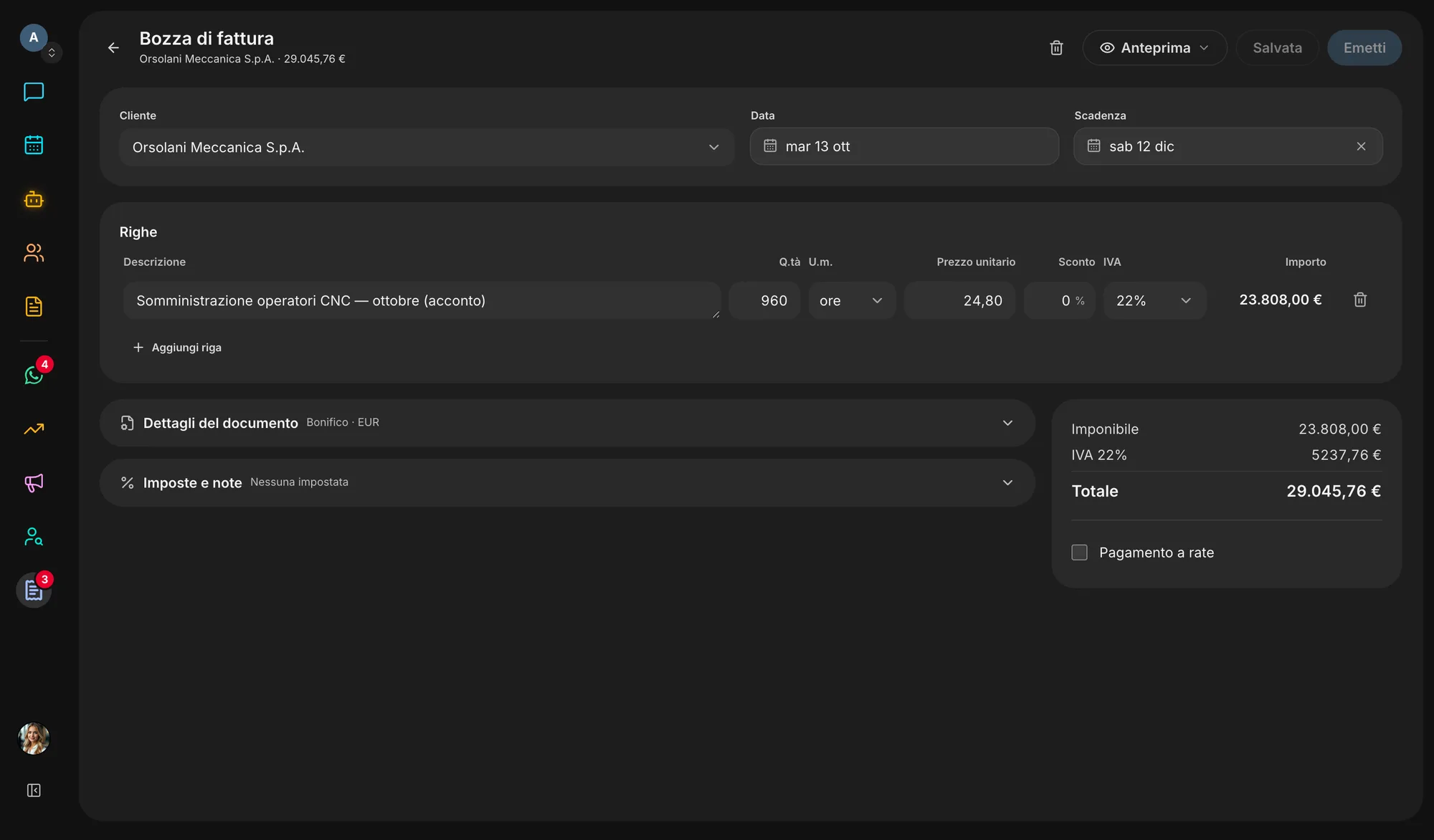
An accepted quote or a won deal becomes a draft, and if a won deal sits unbilled for a week, Sales drafts the invoice for you. The number is only taken at issue. FatturaPA to Italy’s SDI from your certified mailbox; UBL, XRechnung, CII and Factur-X elsewhere.
Aging by due date, instalments, reminders sent automatically or after your approval, bank statements imported and matched to invoices, SEPA files. Every customer gets a portal with their documents and statement.
Recurring plans prepare the draft every period, usage-based or tiered too, with a notice 30 and 7 days before a term ends or renews.
VAT for the period, tax deadlines, cash forecast, MRR and churn, margin per customer. Exports for your accountant, including DATEV and FEC.
Inside the app
How it works
From a Hunter contact, from a company’s website, or just from its name.
Lines from your catalogue, VAT worked out, a link for the customer instead of a PDF to chase.
The draft is ready from the accepted quote: check it, issue it and, if you invoice in Italy, send it to the SDI.
Record payments or match them from the bank statement; reminders go out on their own or after your OK.
Ecosystem
Customers found, spend to rebill and the agents’ work arrive in Sales already filled in: nothing is typed twice.
Switch it on or off in Settings → Apps. Switching it off hides and stops it, nothing is deleted: turn it back on and it is exactly as you left it.
Start freeQuestions
No. An agent prepares drafts, opens and updates opportunities and reads the data; a number is only taken when an admin issues the document. An issued document is never edited or deleted: it is corrected with a credit note.
Yes, if you issue in Italy: Sales generates the FatturaPA and sends it to the SDI from the certified (PEC) mailbox you connect, automatically on issue if you like, and reads the receipts that come back. Veii is not an accredited intermediary today: the channel is your PEC. For other countries it produces UBL, XRechnung, CII and Factur-X.
Yes. The rules follow the issuer’s country: Italy, Spain, France, Germany, the UK, Switzerland and the US have dedicated rules, other countries a generic EU-aware set. You can invoice from several companies and in any currency with an ECB rate, fixed at the moment of issue.
By bank transfer: the IBAN on the invoice, the QR-bill in Switzerland, SEPA direct debits from the files Sales prepares. Payments are recorded by hand or matched from your bank statement. Card payments are not offered today.
No. An opportunity can start from a company’s website or name, and if you only need an invoice you go straight to Invoices. With Hunter on, though, the customer and its details arrive already filled in.
Today Sales is included in every Veii workspace. You switch it on and off in Settings → Apps: switching it off hides it and stops recurring drafts and reminders, but deletes nothing, and issued invoices stay archived.
Create your workspace, switch on Sales and open your first opportunity: the invoice will be born from there.