Who does what, by when?
Tasks live in messages and spreadsheets: owners and due dates get lost at the first hand-off.
Team work
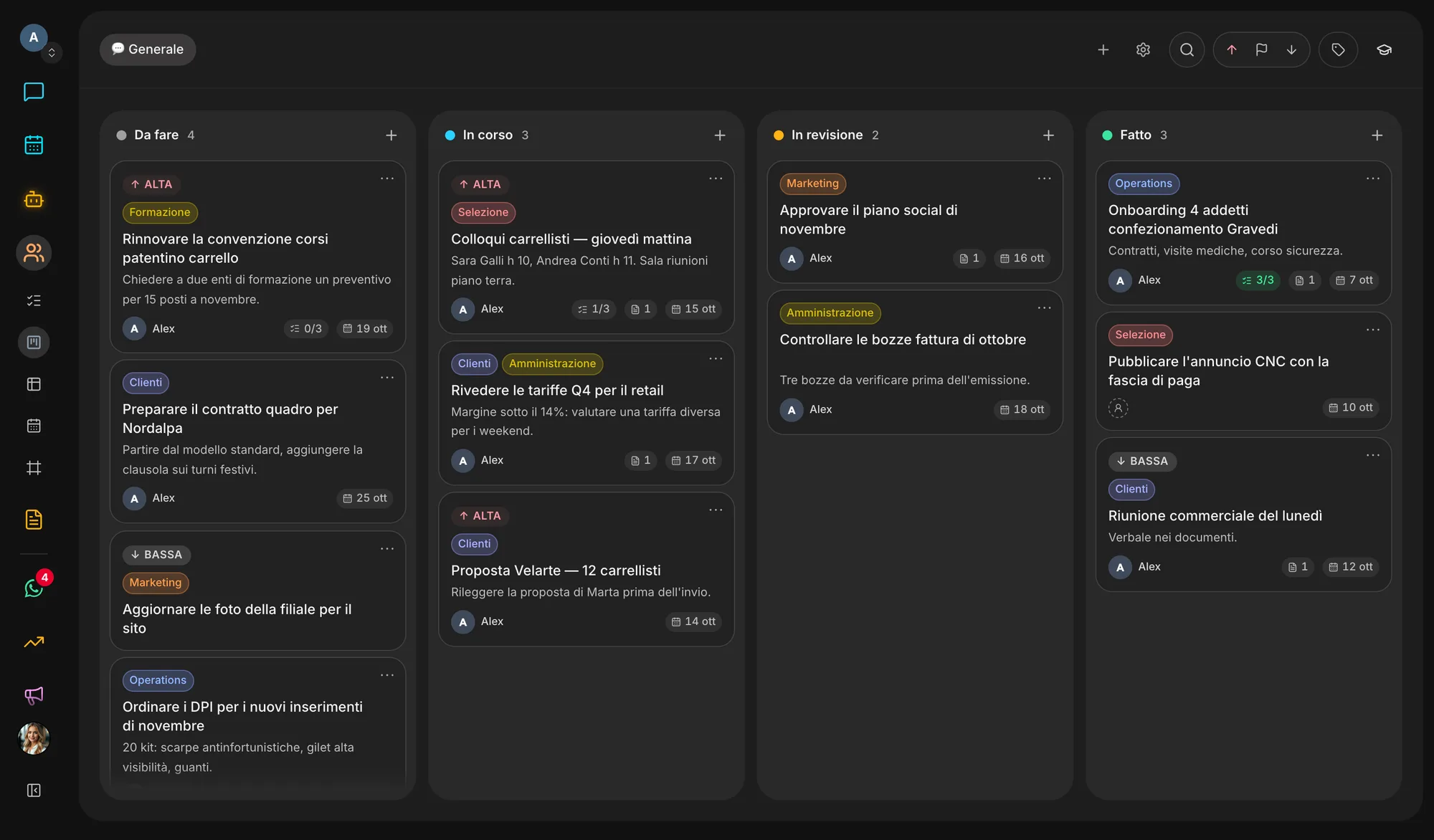
Humans is your people’s space: boards of columns, a list of what is due today and a whiteboard to think things through together. Every card has owners, due dates and documents, and agents read the boards and update them the way a colleague would.
The problem
Tasks sit in one tool, diagrams on a whiteboard, decisions in chat and files in a folder. Whoever joins a project has to piece it all back together.
Tasks live in messages and spreadsheets: owners and due dates get lost at the first hand-off.
Sticky notes and diagrams end up in another tool, far from the cards they should turn into.
An assistant that can’t read your tasks can’t update them, or tell you what is stuck and why.
A confidential project moves to another tool, because there is no way to open it to just a few people.
The result
Meetings just to find out where things stand, missed deadlines and work done twice.
What it does
Today, Board, Table and Calendar are four ways of looking at the same cards. Next to them sits the Whiteboard, for work that needs thinking and drawing first.
Columns you rename and reorder, cards with several owners, priority, labels, checklists, images and links. Sub-cards and dependencies show what is blocking what.
Type “call the supplier tomorrow p1 #purchasing @giulia”: due date, priority, label and owner fill themselves in. Recurring cards come back to the first column for their next date.
Sticky notes, text, shapes, images, people, frames and arrows, with teammates’ live cursors and the option to follow someone’s view. Describe a diagram in words and the whiteboard draws it.
Threads pinned on the whiteboard, to resolve or turn into an agent task in one click. Saved versions put the whiteboard back the way it was.
A board belongs to the whole team or to a few people: its cards, whiteboard and chat all follow the same access list.
Assignments, comment mentions and column moves land in your notifications. By email, by default, one digest a day.
Inside the app
How it works
Your workspace starts with one board and basic columns; add more per project, client or team.
One line from the Today view, or the “+” at the top of any column. Due dates also show up in the Calendar.
Invite colleagues and set permissions: viewers read, editors and admins write.
Ask an agent to open the cards from a meeting, assign them and move them once the work is done.
Ecosystem
Candidates, documents and agents’ work land on the board as cards; what the team decides there flows back to the other apps without retyping it.
Switch it on or off in Settings → Apps. Switching it off hides and stops it, nothing is deleted: turn it back on and it is exactly as you left it.
Start freeQuestions
Today Humans is included in every Veii workspace. You switch it on and off in Settings → Apps: switching it off hides the section and stops what it does, but never deletes boards, cards or whiteboards.
Humans cards are your people’s work; agent tasks have a queue of their own, with execution and deliverables. Agents still read and write cards too, and a whiteboard comment can become an agent task.
No. A private board is visible only to the people on its access list, and only people can be added to it: to an agent, that board does not exist.
Owners, admins and editors create, move and edit. Viewers can browse boards, cards and the whiteboard without changing them.
Yes: dated cards appear in Humans’ Calendar view, across all boards if you like, and in the workspace Calendar next to posts, calls and invoices.
Create your workspace, open the first board and invite your colleagues: agents work on the same cards.