
The same questions, a hundred times
Availability, driving licence, shifts, experience: the first contact is identical for every candidate and eats whole days.
Conversational recruiting
Candidates write where they already are: on WhatsApp. An agent on your team asks the position’s questions, collects the answers and offers an interview time. You step in when it matters and decide who moves on.
The problem
Before you really meet a candidate there are always the same questions, the same waits, the same lost messages. The more roles you open, the more repetitive work piles up.
Availability, driving licence, shifts, experience: the first contact is identical for every candidate and eats whole days.
Long forms, unread emails, unanswered calls: people applying from a phone drop out before they ever reach an interview.
Three messages to find a time, two more to move it, no reminder: the diary fills with gaps.
Indeed, LinkedIn, the website, a flyer: applications come from everywhere and nobody can say which ad brings the right people.
The result
Hours of manual screening, candidates lost before the interview and job-ad budget spent blind.
What it does
Every position has its own questions, ad and links. The agent runs the conversation; people make the decisions.
Options as tappable buttons, follow-ups that appear only after a given answer, voice notes transcribed. When a reply doesn’t answer, the agent asks again once, politely.
The position becomes an application page ready for Google for Jobs, listed on a page with all your open roles. People without WhatsApp answer the same questions on the web.
One for Indeed, one for LinkedIn, one for the flyer: every candidate is credited to the channel they came from, with counts for each position.
The agent offers free times as a list, the candidate taps one and the interview is set; if they need another day, they move it in the same chat. Group interviews too, with several seats per session.
The “waiting” filter shows who is waiting for a reply, a notification tells you when the agent hands over, and one click makes the conversation yours. Your replies become ready answers for next time.
Import positions from your job board (Greenhouse, Lever, Workday, Personio, InRecruiting and more) or your careers page; every 12 hours Prescreening checks it again and closes the position when the ad is gone.
Inside the app
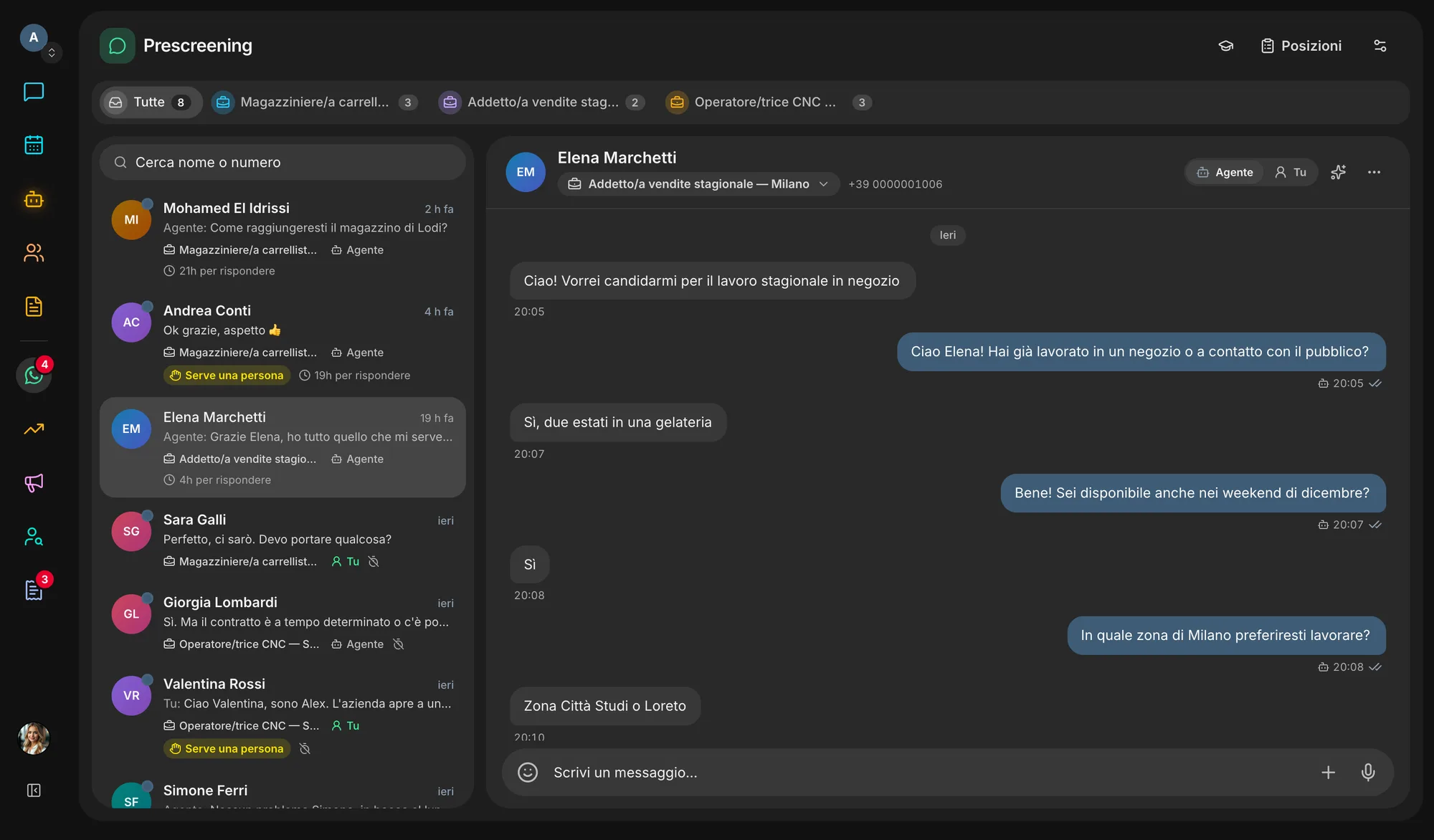
How it works
Connect the company’s WhatsApp Business number in Settings → Integrations, then choose which agent on your team answers.
From scratch, from a template, with AI or imported from your ATS: the job, the questions, what the agent should know.
Switch the ad on and share the per-channel links — or write first, to one person or a whole list.
The agent asks the questions and offers times; anyone who leaves a question hanging gets a single reminder.
Move the right candidates onto the Recruiting board and follow them through to the hire.
Ecosystem
The candidate talks to an agent, lands on a board and steers the job-ad budget: each piece lives in the right app and the data flows on its own.
Switch it on or off in Settings → Apps. Switching it off hides and stops it, nothing is deleted: turn it back on and it is exactly as you left it.
Start freeQuestions
Today it is included in every Veii workspace and switched on or off in Settings → Apps: switching it off hides and stops the section without deleting positions or conversations. WhatsApp messages are billed by Meta to your WhatsApp Business account, at the rate for the number’s country.
No. Expected answers only highlight replies on the candidate’s sheet: the agent is never told them and excludes nobody. A person decides who moves on.
From the position page they answer the same questions on the web, leaving a name and email. Their application reaches the Recruiting board like the others.
No. Import positions from your job board or careers page link, and with the connector in Settings → Integrations anyone who applies in your ATS gets the first message on WhatsApp. Prescreening writes nothing back to your ATS.
A conversation left untouched beyond the period set for the number (365 days unless you change it) deletes itself. Candidates can also write “delete my data” and the conversation is erased at once.
Create your workspace, connect your WhatsApp Business number and let an agent run the first screening. The decisions stay yours.